The Utah Judiciary is aware of a scam involving text messages that falsely appear to come from the courts and demand payment through links or QR codes. These messages are not legitimate - courts do not request payments this way, and individuals should not respond or provide any personal or financial information. More Info

MyCourtCase (Access your case online)

A MyCourtCase account is not required to attend a hearing.

We have created an easy guide to help walk you through how to participate in a remote court hearing.

What is MyCourtCase?

MyCourtCase is a Utah State Courts online system. With MyCourtCase you can:

  • View your case history: Track everything that has happened in your case
  • Read filed papers: See all documents given to the court
  • Pay fines and fees: Conveniently make payments for your case
  • Link cases: View all of your cases in one place

There is no fee to use any of these features in MyCourtCase.

Is your case in Juvenile Court? Go to the Juvenile MyCase page.

1 The Court’s MyCase is not the same as the Department of Workforce Services (DWS) MyCase. The DWS MyCase is for public benefits like unemployment or food stamps. Even if you have a login for the DWS MyCase, you still need to create a separate login for the Court's MyCase to see your court papers.

Working on a traffic ticket or criminal case?

Learn about Deferred Traffic Prosecution
Save time - pay your fine for a traffic misdemeanor case without registering for MyCourtCase

Read below to see if you can use MyCourtCase. You can also find out how to sign up for an account, see your case history, file and serve court papers, and link your cases.

MyCourtCase is only for parties to a case
A party is someone suing or being sued. This is usually the petitioner or plaintiff and the respondent or defendant. Also these people can make an account for most case types: conservator, guardian, defendant garnishee, heir, incapacitated person, intervenor, personal representative, third party complainant, third party defendant and third party petitioner.  

NEW: A victim of a criminal case can now create a MyCourtCase account to access their case documents and history.

MyCourtCase is available for almost any kind of case
A party to almost any kind of case in district and justice courts can use MyCourtCase. The case can be open or closed. Do you have a juvenile case? Visit Juvenile MyCase for more information.

These case types are NOT available in MyCourtCase because they have private details: 

  • Involuntary commitment
  • Essential treatment 

If you are a....
Then you can...

Business trying to access a case that is not a part of online dispute resolution    

Ask your lawyer for details about your case or use Xchange

Interested person (a person who has the right to be notified of filings) in a probate case

Ask the petitioner for details about your case or use Xchange

Lawyer or Licensed Legal Paralegal Practitoner (LPP)

Use your eFiling provider for parties you represent, or use Xchange

Researcher

Use Xchange

Visit the MyCourtCase login page and click "Create a new MyCase account" to sign up. You will need:

  • an email address
  • your case number, and
  • your government issued ID (if you have a non-Utah ID, please email mycase@utcourts.gov with a picture of your ID and your case number - you can also email them to ask for a secure link to send your ID)

The system will email you instructions. Look for an email from courtsystems@utcourts.gov. The subject line will say “Utah Courts - MyCase Registration.”

Not seeing it? Check your spam folder.

Here are the most common reasons why you might get stuck and how to fix them:

  • Your name does not match
    • Look at your court papers and make sure your name is entered correctly
    • Try leaving out your middle name
  • Court location is wrong
    • Look at your court papers to see if your case is in a district court or a justice court
    • If your case is in the Third District Court, choose Salt Lake County
    • If your case is in a justice court, look for a location that ends with the words "justice court"
    • If your case is in a district court, your location will NOT end with the words "justice court"

If you have a non-Utah ID or have other problems creating an account, visit My Court Case Access Help.

Filing papers means giving your court papers to the court. You can use MyCourtCase to see your court cases online. But you can only file your papers (send them to the court through MyCase) if your case type is on this list::

  • Debt Collection
  • Eviction
  • Small Claims 
  • Name or Sex Designation Change
  • Adult Protective Orders (Cohabitant Abuse, Dating Violence, and Sexual Abuse)
  • Criminal Law and Tickets (Parking Citations, Parking Court Cases, Traffic Citations, Traffic Court Cases, Deferred Traffic Prosecution, Infractions, Misdemeanors, and State Felonies) 

If your type of case is not on this list, you cannot file through MyCase right now. See our page on Filing Procedures for help on how to turn in your papers. 

Follow these steps to send your court papers through MyCourtCase: 

Scroll down to the eDocument Preparation section on your screen and click the blue File an eDocument button.

Click Attach File to upload a document from your computer, or click Fill Out Form to type your information directly into a fillable form on your screen.

Go back to your main Home Screen right away. Look at the Status column under eDocument Preparation to confirm that your court papers show up as "submitted".

If you made a mistake: You can still delete your papers if the status says "submitted" or "revisions needed." Look for the red minus symbol next to the name to remove them.

MyCourtCase can deliver your papers automatically as long as the other party has a lawyer or their own MyCourtCase account. 

How to check: 

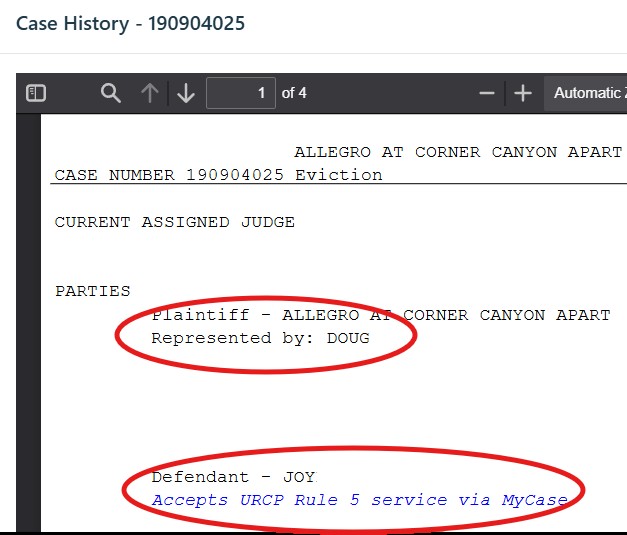
  1. Click your case number from the main screen.
  2. Look at page one of your case history.
A picture of a case history. The plaintiff shows as being represented and has a red circle around their name. The defendant shows as using MyCourtCase and accepting service that way. There is also a red circle around the defendant. A sample case history, showing who can be served via MyCourtCase


If you see a lawyer listed or the text "Accepts URCP Rule 5 service via MyCase", the system serves them automatically. If you do not see this, you must send them a copy yourself via email or regular mail. See our page on Serving Papers for delivery options.

Court staff must look over your papers before they are officially accepted. 

If court staff accept your papers a day after you submit them, your papers will still be considered filed on the date you submitted them. 

When you file papers in MyCourtCase, you cannot remove them. If you need to make corrections to a paper you filed then you can file an amended pleading. Read Utah Rule of Civil Procedure 15 for guidance.

If your papers are returned, check the reason under eDocument Preparation.

Look for “Revisions Needed” and click the red exclamation mark.

Make the needed changes before resubmitting.

Your resubmitted papers will be considered filed on the date you resubmit them.

You can ask to have all of your district and justice court cases linked to your MyCourtCase account. Follow these steps to link your cases:

Step 1: Click MyProfile.

Step 2: Under Linked Cases, click Add Case(s).

Step 3: Fill in the case number and choose the court location.

Step 4: Check the three boxes for the agreements.

Step 5: Click Send Request.

The court will verify your request. It could take a few days.

View your linked cases by clicking on the case number drop down menu on the main MyCourtCase tab.